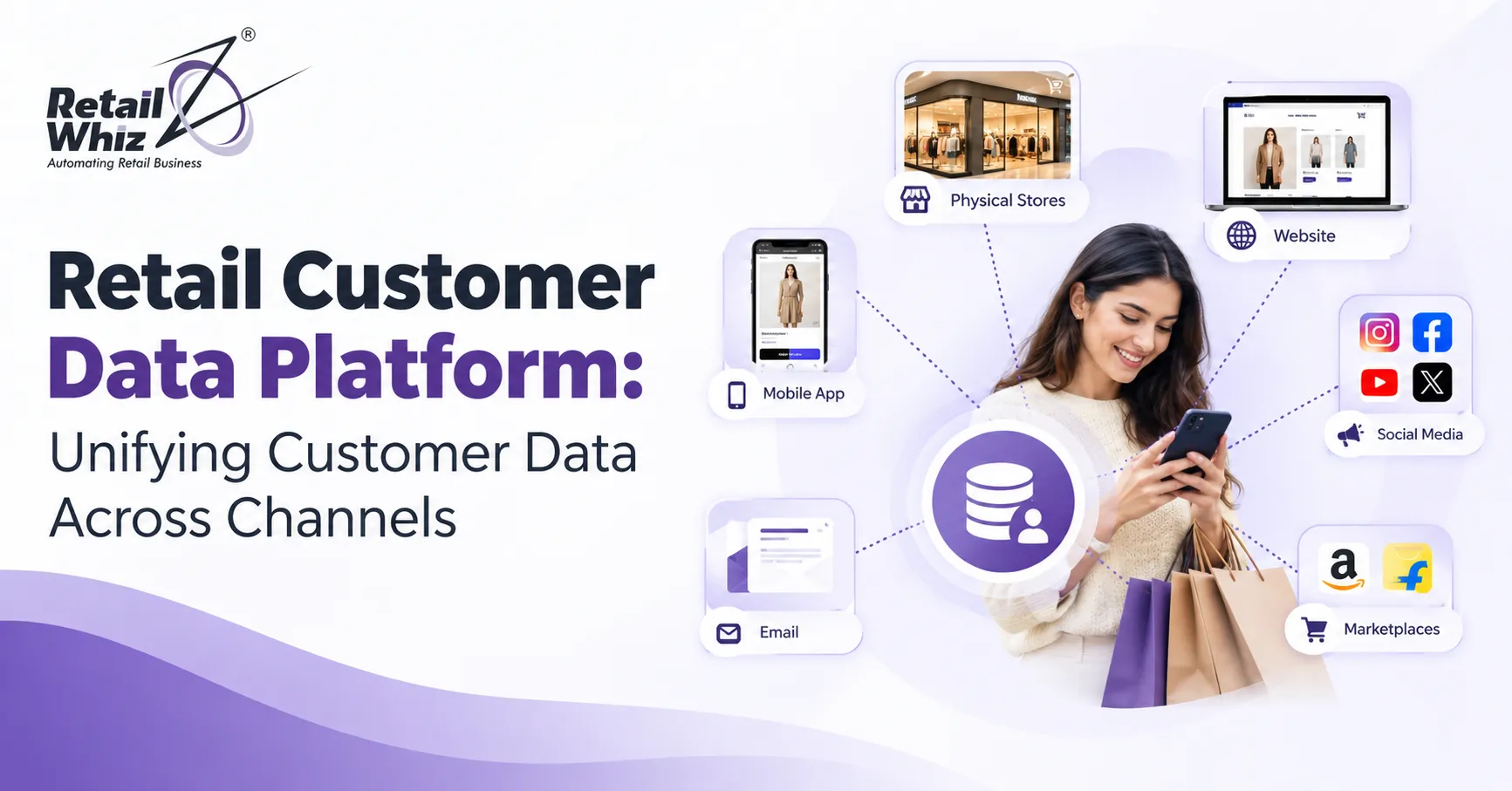
A shopper browses your website on Monday, checks a product on Instagram on Wednesday, and walks into your store on Saturday to buy it with a coupon from an email. To your business, that one person may look like three different customers, stored in three different systems. This is the core problem a retail customer data platform is built to solve.
Today’s customers expect every interaction to feel connected. They want you to remember their preferences, their purchase history and their loyalty status, whether they shop online, in-store or through a mobile app. Retailers that cannot deliver this lose sales to competitors who can.
In this guide, we explain what a customer data platform (CDP) is, why retailers need one, how it unifies customer data across channels, and how to choose and implement the right solution for your business.
What Is a Retail Customer Data Platform?
A customer data platform is a software system that collects customer data from every touchpoint, cleans and merges it, and builds a single, persistent profile for each shopper. That profile is then made available to your marketing, sales, service and operations teams.
For retailers, a CDP pulls information from sources such as:
- Point of sale (POS) transactions in physical stores
- Ecommerce websites and mobile apps
- Loyalty and membership programs
- Email, SMS and WhatsApp campaigns
- Social media and advertising platforms
- Customer support tools and feedback forms
- Payment gateways and returns data
The result is what many marketers call a customer 360 view: one complete picture of who the customer is, what they buy, how they shop and what they are likely to want next.
How a CDP Differs from a CRM or Data Warehouse
People often confuse these tools, so here is a quick comparison.
- CRM: Manages relationships and sales interactions, usually based on data entered by your team. It rarely captures behavioral data from every channel.
- Data warehouse: Stores large volumes of data for analysis, but typically needs technical teams to query it and does not activate data for campaigns on its own.
- Customer data platform: Automatically ingests data from many sources, resolves identities, creates unified profiles and pushes segments to the tools your teams use every day.
Why Retailers Struggle with Fragmented Customer Data
Most retailers did not set out to create data silos. They grew naturally. A POS was installed for billing, an ecommerce store was added later, a marketing tool came next, and a loyalty app followed. Each system collects customer information, but none of them talk to each other well.
This creates several costly problems:
- Duplicate and inconsistent profiles. The same customer appears under different names, phone numbers or email addresses.
- Incomplete purchase history. Online and offline purchases are not combined, so you cannot see lifetime value accurately.
- Generic marketing. Without a unified view, you send the same offer to everyone, including customers who just bought that item.
- Poor customer service. Store staff cannot see online orders, and support teams cannot see in-store returns.
- Weak inventory decisions. Demand signals from different channels are not combined, which leads to stockouts of popular items and overstock of slow movers.
Understanding how your core systems fit together is the first step. If you are still deciding between a standalone billing tool and a full business platform, this comparison of retail ERP vs POS software explains how each handles customer and transaction data, which matters a lot when you start unifying information.
Key Benefits of a Retail Customer Data Platform
1. A True Omnichannel Customer View
Omnichannel retail only works when every channel shares the same customer information. A CDP links online browsing, app activity, store purchases and service history to one profile, so you can recognize a customer wherever they appear.
2. Personalization at Scale
Retail personalization is one of the highest search and investment priorities for brands today. With unified data, you can recommend products based on real purchase behavior, send birthday offers, and trigger win-back campaigns for customers who have not purchased in 90 days. This is far more effective than broad promotional blasts.
3. Smarter Customer Segmentation
Instead of basic groups such as “all customers” or “women aged 25 to 34”, you can build dynamic segments based on behavior. Examples include high-value shoppers, discount seekers, first-time buyers, cart abandoners and lapsed loyalty members. These segments update automatically as new data arrives.
4. Higher Customer Lifetime Value
When you know what a customer buys and when, you can time your communication better. This improves repeat purchase rates, increases average order value and extends the customer relationship.
5. Better Use of First-Party Data
With third-party cookies fading and privacy rules tightening, first-party data is now your most valuable marketing asset. A CDP helps you collect, organize and use this data responsibly, with consent management built into the process.
6. Improved Marketing ROI
Unified data reduces wasted ad spend. You can exclude existing customers from acquisition campaigns, build lookalike audiences from your best shoppers, and measure which channels truly drive revenue.
7. Consistent Customer Experience
Whether a customer contacts your call center, visits a store or opens your app, every team sees the same history. That consistency builds trust and loyalty.
How a CDP Unifies Customer Data Across Channels
Understanding the process helps you plan your project. Most retail CDPs work in five stages.
Step 1: Data Collection
The platform connects to your data sources through APIs, connectors, file uploads or real-time streaming. This includes transactional data (purchases, returns, payments), behavioral data (page views, searches, clicks) and profile data (name, contact details, preferences).
Step 2: Identity Resolution
This is the heart of any CDP. The system matches records that belong to the same person using identifiers such as phone number, email, loyalty ID, device ID and card tokens. Using deterministic and probabilistic matching, it merges duplicate records into one golden customer profile.
Step 3: Data Cleansing and Standardization
Raw data is messy. The CDP standardizes formats, corrects errors, removes duplicates and fills gaps, so your reports and campaigns rely on accurate information.
Step 4: Segmentation and Analysis
Marketers and analysts can build audience segments, calculate customer lifetime value, score purchase propensity and identify churn risk without writing code.
Step 5: Activation
The unified profiles and segments are sent to your email platform, SMS tools, advertising accounts, loyalty engine, POS and service desk. This is where data turns into revenue.
Essential Features to Look for in a Retail CDP
Not every platform suits every retailer. When evaluating options, check for these capabilities:
- Pre-built connectors for POS, ecommerce, ERP, payment and marketing tools
- Real-time or near real-time data processing
- Strong identity resolution that handles online and offline records
- Consent and privacy management aligned with India’s Digital Personal Data Protection Act, GDPR and other relevant rules
- No-code segmentation that marketing teams can use independently
- Predictive analytics for churn, next best product and lifetime value
- Scalability for growing product catalogs, stores and customer bases
- Data security including encryption, role-based access and audit trails
Integration: The Make-or-Break Factor
A CDP is only as good as the data flowing into it. Retailers frequently run a mix of legacy billing software, ERP modules, ecommerce platforms and third-party apps. Connecting all of these cleanly often requires custom work, particularly when your systems have unique workflows or older architecture.
That is why planning for retail software customisation and integration early in your project is so important. Proper integration ensures that sales, stock, customer and payment data move reliably between systems, so your customer profiles stay accurate and up to date.
Real-World Retail Use Cases for a CDP
Fashion and Lifestyle Retail
A fashion chain can combine store purchases with website browsing to recommend styles, sizes and colors a customer is most likely to buy. It can also invite top-spending customers to private sales events.
Grocery and Supermarkets
A supermarket can analyze basket data to identify customers who buy specific categories, such as organic products or baby care, and send targeted offers. It can also spot customers whose visit frequency is dropping and re-engage them quickly.
Pharmacy and Health Retail
Refill reminders based on past purchases improve convenience and customer retention. Unified records also help staff offer relevant products during checkout.
Electronics and Home Retail
Retailers can track the research phase online and the purchase in-store, then follow up with accessories, warranties and service plans at the right time.
Loyalty-Driven Retail
A CDP makes loyalty programs much stronger. When points, tiers, purchase history and preferences sit in one profile, you can reward customers across every channel and design offers that actually matter to them. Retailers who want to turn customer data into repeat purchases can explore a dedicated loyalty program software that works alongside unified profiles to drive repeat visits and higher spend.
Common Challenges and How to Overcome Them
Challenge 1: Poor Data Quality
Start with a data audit. Clean existing records, define standard formats and set rules for data entry at every touchpoint.
Challenge 2: Lack of Clear Goals
Define what success looks like before you buy. Common goals include increasing repeat purchase rate, reducing churn or improving campaign conversion.
Challenge 3: Privacy and Compliance Concerns
Collect clear consent, give customers control over their data, and work only with vendors that follow strong security practices.
Challenge 4: Low Team Adoption
Train marketing, store and service teams on how to use customer insights. A powerful platform fails if no one uses it.
Challenge 5: Trying to Do Everything at Once
Launch with two or three high-impact use cases, such as abandoned cart recovery and loyalty segmentation, then expand over time.
How to Implement a Retail Customer Data Platform: A Practical Roadmap
- Set business objectives. Tie the project to measurable outcomes such as revenue per customer or repeat purchase rate.
- Map your data sources. List every system that holds customer data and note what each captures.
- Audit and clean your data. Remove duplicates and fix inconsistencies before migration.
- Choose your platform. Shortlist vendors based on integrations, scalability, ease of use and support.
- Plan integrations. Define how data will flow in and out of the CDP.
- Build unified profiles and key segments. Begin with your most valuable customer groups.
- Activate across channels. Connect to email, SMS, ads, POS and loyalty tools.
- Measure, learn and optimize. Track KPIs and refine segments and campaigns continuously.
Measuring Success: KPIs for Your Retail CDP
To prove the value of your investment, track metrics such as:
- Customer lifetime value (CLV)
- Repeat purchase rate
- Average order value
- Customer retention and churn rate
- Campaign conversion rate
- Percentage of customers with a unified profile
- Revenue from personalized campaigns
- Cost of customer acquisition
Accurate reporting depends on strong dashboards that bring these numbers together in one place. Solutions such as MIS and analytics help retailers turn unified customer and sales data into clear reports, so leaders can make faster and better decisions.
The Future of Retail Customer Data Platforms
The CDP space is evolving quickly. Expect to see more AI-driven recommendations, predictive models that forecast customer behavior, real-time personalization on every channel, and tighter links between customer data and supply chain planning. Retailers that build a solid data foundation now will be ready to adopt these capabilities as they mature.
Conclusion
A retail customer data platform gives you something every retailer wants: a clear, complete understanding of every customer across every channel. By unifying online, in-store and mobile data into a single customer 360 view, you can personalize experiences, improve loyalty, increase marketing efficiency and make smarter business decisions.
The journey starts with clean data, clear goals and well-planned integrations. Begin small, prove the value, and scale as your team gains confidence. In a market where customers expect seamless experiences, unified customer data is no longer optional. It is the foundation of sustainable retail growth.
Frequently Asked Questions (FAQs)
1. What is a retail customer data platform?
A retail customer data platform is software that collects customer data from POS systems, websites, mobile apps, loyalty programs and marketing tools, then merges it into one unified profile per customer. Retail teams use these profiles for segmentation, personalization and omnichannel marketing.
2. How does a CDP unify customer data across channels?
A CDP connects to all your data sources, collects customer information and uses identity resolution to match records that belong to the same person, such as through phone number, email or loyalty ID. It then cleans the data and creates a single customer profile that updates as new interactions happen.
3. What is the difference between a CDP and a CRM?
A CRM mainly stores customer contact details and sales interactions, often entered manually. A CDP automatically gathers behavioral and transactional data from many channels and builds unified profiles that can be activated across marketing and service tools.
4. Does my retail business need a CDP?
If you sell across more than one channel, run a loyalty program, or struggle with duplicate customer records and generic marketing, a CDP can deliver strong value. Smaller single-store retailers may start with integrated POS and ERP software and add a CDP as they grow.
5. How long does it take to implement a retail CDP?
Timelines vary based on the number of data sources, data quality and integration complexity. A focused rollout with a few key use cases can often go live within a few weeks to a few months, while larger multi-channel projects take longer.