Running a store today is very different from what it was ten years ago. Customers expect fast checkouts, accurate stock, personalised offers and digital payment options. Meanwhile, owners face rising rent, tighter margins and constant GST compliance work. Doing all of this with paper registers and scattered spreadsheets is no longer practical.
This is why the right retail software has become a core business asset, not an optional upgrade. Whether you run a single grocery shop, a fashion boutique, a pharmacy or a chain of supermarkets, the right retail management software helps you sell faster, stock smarter and make better decisions.
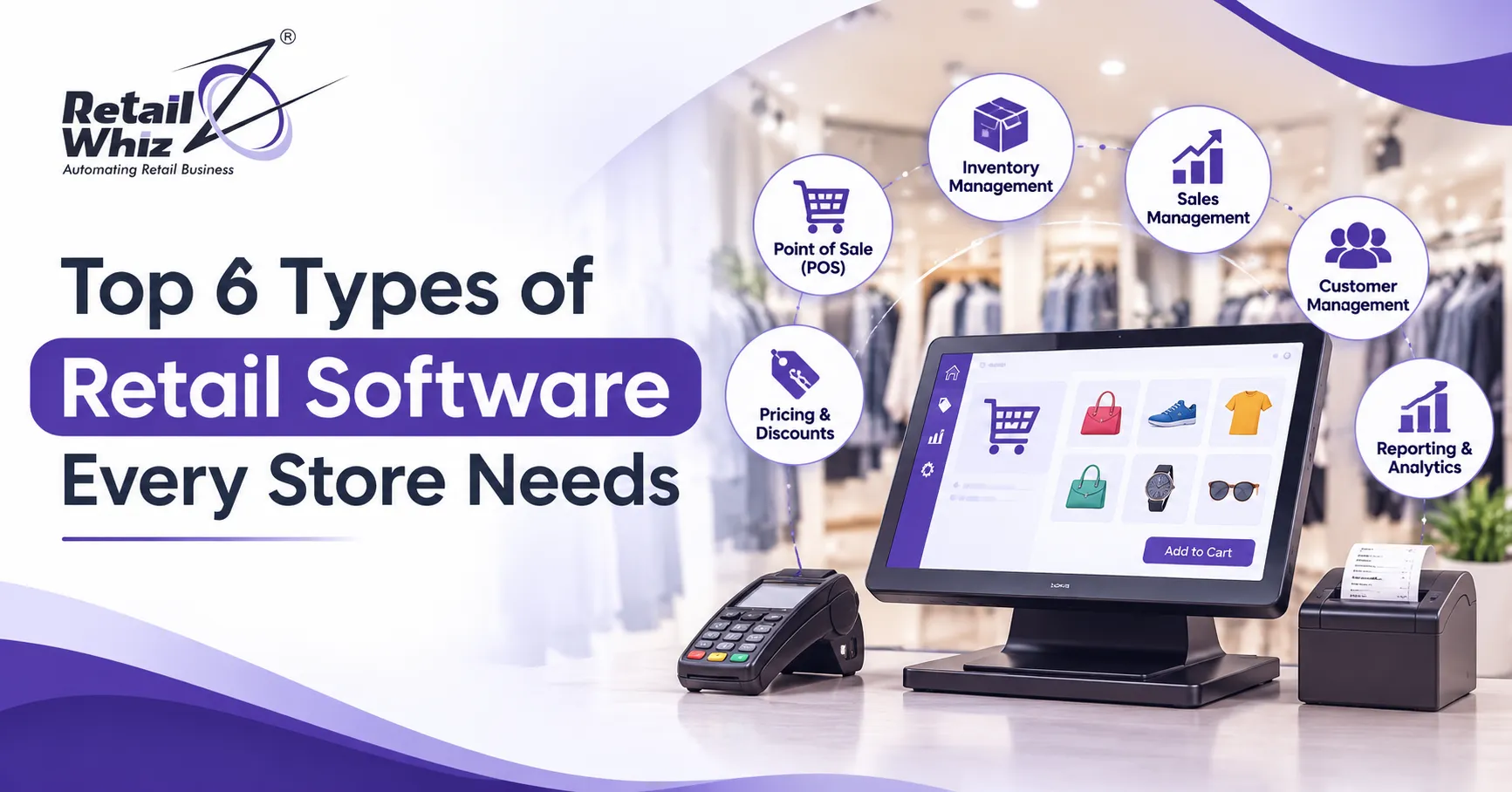
But with so many tools available, where should you start? In this guide, we break down the top 6 types of retail software every store needs, what each one does, and how to choose the best fit for your business.
Why Retail Software Matters in 2026
Before we look at the list, it helps to understand why retailers are investing in technology at this pace.
- Customers expect speed. Long billing queues push shoppers to competitors.
- Stock errors are expensive. Overstocking locks up cash, while stockouts lose sales.
- Compliance is complex. GST invoicing, e-invoicing and returns need accurate data.
- Competition is digital. Even small stores now compete with online marketplaces and quick-commerce apps.
- Data drives growth. Stores that track sales trends make smarter buying and pricing decisions.
The right software stack solves all five problems. Let us look at the six types you should consider.
1. Retail POS Software (Point of Sale System)
Every store needs a dependable point of sale system. It is the heart of your shop floor, where sales, payments and customer interactions happen.
Modern retail POS software does much more than print a bill. It handles barcode scanning, multiple payment modes (cash, cards, UPI and wallets), discounts, returns, exchanges and hold-and-resume bills. It also updates your stock the moment a sale is made, so your numbers are always current.
Key features to look for:
- Fast barcode-based billing
- Support for UPI, card and wallet payments
- Promotions, coupons and combo offers
- Returns and exchange handling
- Offline billing mode for poor connectivity
- Multi-counter and multi-store support
A good POS system cuts checkout time, reduces billing mistakes and gives staff less to remember.
Best for: Supermarkets, grocery stores, fashion outlets, pharmacies, bakeries and general stores.
2. Billing and GST Compliance Software
In India, accurate tax handling is not negotiable. GST billing software ensures that every invoice carries the correct HSN codes, tax rates and customer details, and that your returns match your sales data.
Without it, owners spend hours each month reconciling invoices, correcting mistakes and preparing data for their accountant. With it, tax calculations happen automatically at the time of billing.
What good GST billing software should offer:
- Automatic GST calculation (CGST, SGST and IGST)
- HSN and SAC code mapping
- E-invoicing and e-way bill support
- GSTR-ready sales and purchase reports
- Integration with accounting tools such as Tally
Many retailers pick billing software for a retail shop that combines billing and tax compliance in one system. This reduces double entry, lowers the risk of penalties and gives your accountant clean data. When billing and compliance sit together, month-end closing becomes far less stressful.
Best for: Any registered business that issues GST invoices, which in practice means almost every store.
3. Inventory Management Software
If POS is the heart of your store, inventory management software is the backbone. Stock is usually the largest investment a retailer makes, and poor control of it quietly drains profit.
Good inventory software tracks every item from the moment it is purchased to the moment it is sold. It shows what is in stock, what is moving slowly, what is about to expire and what needs reordering.
Benefits of retail inventory software:
- Real-time stock visibility across all stores and warehouses
- Automatic reorder alerts based on minimum stock levels
- Batch, expiry and serial number tracking
- Size, colour and style variants for apparel and footwear
- Reduced shrinkage, theft and wastage
- Easy stock transfers between outlets
For grocery, bakery and pharmacy businesses, expiry tracking alone can save a significant amount of money each year. For fashion retailers, variant tracking prevents the common problem of having the wrong sizes on the shelf.
If stock mismatches and dead inventory are hurting your margins, a dedicated inventory management software can give you live visibility and cleaner control across every location.
Best for: Multi-product stores, chains, supermarkets, pharmacies and fashion retailers.
4. Customer Relationship Management (CRM) and Loyalty Software
Winning a new customer costs far more than keeping an existing one. That is why customer loyalty software and retail CRM tools have become a must-have.
A CRM records who your customers are, what they buy, how often they visit and how much they spend. A loyalty module then uses this data to reward repeat shoppers through points, discounts, membership tiers and personalised offers.
What you can do with retail CRM and loyalty tools:
- Run points-based and tier-based loyalty programs
- Send birthday and anniversary offers by SMS or WhatsApp
- Segment customers by spending and purchase behaviour
- Launch targeted campaigns for slow-moving products
- Bring lapsed customers back with win-back offers
Even a small store can build a strong base of repeat buyers using simple loyalty rules. Over time, this lowers your marketing cost and raises your average basket value.
Best for: Supermarkets, fashion stores, beauty outlets, kids’ stores and any business that depends on repeat visits.
5. Retail Analytics and MIS Reporting Software
You cannot improve what you do not measure. Retail analytics software turns your daily transactions into clear reports and dashboards that help you decide what to buy, what to discount and where to invest.
Instead of guessing which products sell best, you can see it in a report. Instead of wondering which store is underperforming, you can compare outlets side by side.
Reports every retailer should track:
- Sales by product, category, brand and time period
- Gross margin and profit by item
- Fast-moving and slow-moving stock
- Staff and counter-wise performance
- Store-wise comparison for chains
- Customer buying trends and basket size
With the right reports in hand, owners can negotiate better with suppliers, plan seasonal stock and spot problems early. A strong MIS and analytics solution gives you these insights on one dashboard, so decisions are based on facts and not instinct.
Best for: Growing retailers, multi-store businesses and owners who want to manage from a distance.
6. Retail ERP Software (All-in-One Retail Management)
Once your business grows, using separate tools for billing, stock, purchasing, accounts and reporting starts to cause friction. Data gets duplicated, reports do not match and teams waste time moving information between systems.
This is where retail ERP software comes in. An ERP brings core functions into one connected platform, including POS, inventory, purchasing, vendor management, accounting, loyalty and analytics. Every department works from the same data, so the numbers always agree.
Advantages of retail ERP software:
- A single source of truth for sales, stock and finance
- Smooth purchase-to-sale workflow
- Centralised control for head office and branches
- Fewer manual errors and less duplicate entry
- Easier scaling when you open new stores
- Better supplier and purchase order management
Retail ERP is especially useful for supermarkets, hypermarkets, fashion chains and distributors that handle high product volumes and multiple locations. Smaller shops can start with POS and inventory and move to a full ERP as they grow.
Best for: Chains, supermarkets, hypermarkets, departmental stores and fast-growing retailers.
How to Choose the Right Retail Software for Your Store
With the six types explained, the next question is how to pick the right solution. Use this checklist before you decide.
- Define your needs first. List your biggest problems, such as slow billing, stock mismatches or tax errors.
- Check industry fit. A pharmacy needs batch and expiry tracking, while a boutique needs size and colour variants.
- Look for GST readiness. Make sure e-invoicing and GST reports are built in.
- Prefer scalable systems. Choose software that can handle more stores, users and products as you grow.
- Check integrations. Payment gateways, accounting tools and e-commerce platforms should connect easily.
- Ask about support and training. Good onboarding and quick support keep your team productive.
- Review data migration options. You should be able to move your existing data without losing records.
- Compare total cost. Look beyond the licence fee to include setup, training and support.
Common Mistakes Retailers Make When Buying Software
Avoid these pitfalls to protect your investment:
- Buying on price alone. The cheapest option often lacks features you will need within a year.
- Ignoring staff training. Even great software fails when the team does not know how to use it.
- Skipping a demo. Always test the software with your own products and workflows.
- Using disconnected tools. Separate systems for billing and stock lead to constant mismatches.
- Not planning for growth. A tool that works for one store may struggle with five.
Final Thoughts
The right technology does not just save time. It protects your margins, keeps customers coming back and gives you the clarity to grow with confidence. To recap, every store should consider these six types of retail software:
- Retail POS software
- Billing and GST compliance software
- Inventory management software
- CRM and loyalty software
- Retail analytics and MIS software
- Retail ERP software
You do not have to adopt all six at once. Start with the one that solves your most urgent problem, then expand step by step. And when you are ready to roll out a connected system across your stores, a structured retail ERP implementation process helps you go live smoothly, with your data, team and workflows set up correctly from day one.
Frequently Asked Questions (FAQs)
1. What is retail software?
Retail software is a set of digital tools that help stores manage billing, inventory, customers, purchasing, accounting and reporting. It replaces manual work with automated processes, which reduces errors and saves time.
2. Which retail software is most important for a small store?
Most small stores should start with POS software that includes GST billing and basic inventory tracking. This combination solves the most common daily problems, which are slow billing, tax errors and stock mismatches.
3. What is the difference between a POS system and retail ERP software?
A POS system focuses on the billing counter and records sales and payments. Retail ERP software covers the wider business, connecting POS with inventory, purchasing, accounting, loyalty and analytics in one platform. Small shops often begin with POS and move to ERP as they grow.
4. Can retail software handle multiple stores?
Yes. Modern retail management software supports multi-store operations, with centralised control of pricing, stock transfers, purchasing and reports. Owners can compare store performance and monitor everything from one dashboard.
5. Is GST billing software necessary for every retailer?
If your business is registered under GST, accurate invoicing and return filing are mandatory. GST billing software automates tax calculation, supports e-invoicing where applicable and prepares clean data for your returns, which lowers the risk of errors and penalties.